


Open the ZEN.COM app, and go to Wallet from the bottom menu.
Open the ZEN.COM app, and go to Wallet from the bottom menu.
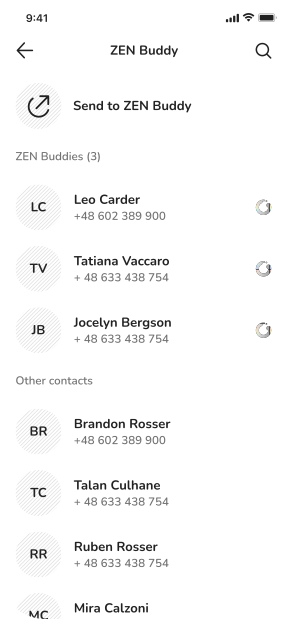
Then, tap "Transfer" and select ZEN Buddies as your transfer method.
Select ZEN Buddies as your transfer method.


Download the ZEN.COM app
and register in minutes.
Register in minutes. Start with your app store.
 Scan to download
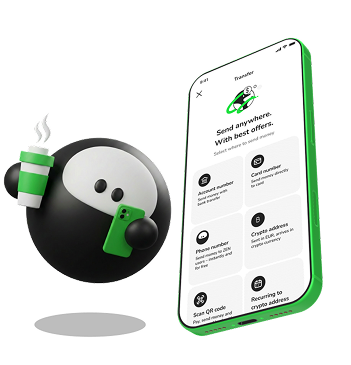 Enter a ZEN.COM user's phone number and the money arrives in seconds. No bank details, no IBAN.
Enter a ZEN.COM user's phone number and the money arrives in seconds. No bank details, no IBAN.
Enter a ZEN.COM user's phone number and the money arrives in seconds. No bank details, no IBAN.




Always for free
Arrives in seconds









Download the ZEN.COM app and open your account. It takes under 5 minutes. Then follow these three steps to send money to any ZEN account user.
Then, tap "Transfer" and select ZEN Buddies as your transfer method.
Select ZEN Buddies as your transfer method.
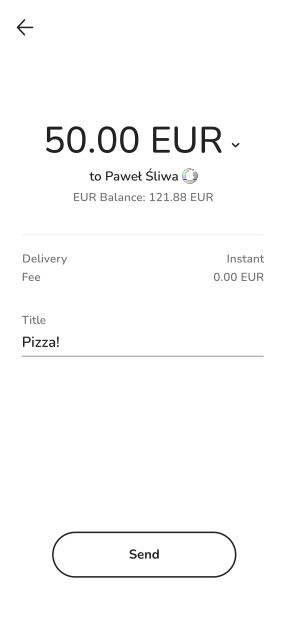
Review the recipient's details before confirming the transfer.
Then, tap "Transfer" and select ZEN Buddies as your transfer method.
If they have a ZEN account, the money arrives in seconds. If not, it waits until they download the app, but no longer than 3 days.
If they have a ZEN account, the money arrives in seconds. If not, it waits until they download the app, but no longer than 3 days.





Licensed financial institution. Your money is regulated and protected.

Secure transfers between verified ZEN accounts.

Licensed financial institution operating globally. ZEN Buddies works between users in all supported countries.
How long does a ZEN Buddies transfer take?
How do I send money with ZEN Buddies?
Does the recipient need a ZEN account?
What happens if the recipient doesn't have the app yet?
What phone number should I use?
No ZEN account? No problem. The money waits until you're ready to collect it.
No ZEN account? No problem. The money waits until you're ready to collect it.

